Heatmap and Routines
findIQ allows you to create your own digital knowledge base - consisting of a heat map and the associated troubleshooting routines. The aim is to capture, structure and directly utilise the knowledge gained from service experience.
Written By Tommy Giesbrecht
Last updated About 2 months ago
What is a heat map at findIQ?
The heat map depicts the error knowledge: It shows which error causes are related to which symptoms - and how often these combinations occur in practice. Based on this, you can store routines: specific step-by-step instructions for rectifying these causes.
Explanation of terms
🔍 Symptom: An observable characteristic such as a sound, odour or display.
🛠️ Cause: A rectifiable fault that triggers a symptom.
📋 Routine: A step-by-step guide to rectifying a cause.
Frequencies
In the heat map, you link causes with symptoms using frequencies, i.e:
always - performs together every time
often - occurs together in many cases
rarely - only occurs together occasionally
never - no connection known
It is important to determine the cause first, then assess the symptom.
With ___ (cause) I recognise ___ (frequency: always, often, rarely, never) the ___ (symptom).
Four steps to your first heat map
Step 1: Collection of errors
Step 1: Collection of errors
Record all relevant observations, descriptions, faults or typical problems - without any fixed structure. The aim is to document existing empirical knowledge without filtering it.
Define the system limits
Who should use the system?
What level of knowledge is required?
Are there errors or symptoms that the user is not allowed to recognise or rectify?
Collect the errors within the defined system limits
Are there categories in which you can summarise the errors?
Make a note of these categories (use the labels within findIQ)
Open questions to get started
What are (typical) faults that occur with this machine?
What is the error pattern for these errors?
What signs do you notice when there is a fault?

Step 2: Creating the heat map
Step 2: Creating the heat map
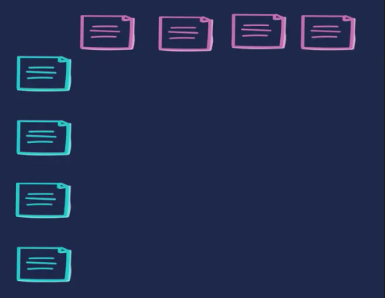
Structure the collected errors: Which entries describe symptoms? Which are causes?
Write down the causes line by line
Enter the symptoms column by column
Cause-orientated questions
In your experience, what is the most common cause of this symptom?
Which components do you check first for this problem?
How do you rectify the error?
Symptom-orientated questions
What do you see, smell, hear, feel or taste?
Which error message appears on the display?
What sounds, odours or changes do you notice?
How do you recognise that something is wrong?
Step 3: Forming connection
Step 3: Forming connection
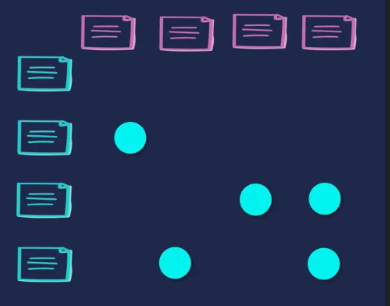
Link causes with symptoms - and assess how often they occur together.
Make the cause-effect relationship explicit
When this happens, what is usually the underlying cause?
How is this symptom related to other errors?
Differentiate between similar errors.
When this happens, what is usually the underlying cause?
How is this symptom related to other errors?
Frequencies
If cause X occurs, how often does symptom Y occur?
Step 4: Assignment of routines
Step 4: Assignment of routines
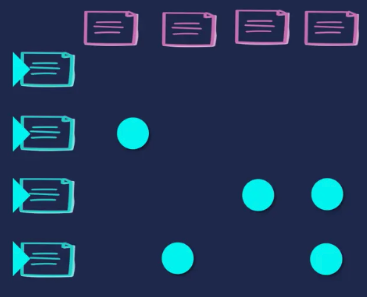
Store suitable instructions to eliminate the recognised causes in a targeted manner.
Create routine title (title of the work instruction)
Assignment of the routines to the respective cause
Formulation in step-by-step instructions
Solution questions
Which steps reliably help to remedy the problem?
How to Structure Your Knowledge Base
In findIQ, knowledge is structured around two central principles: labels and chains.
They allow knowledge to be organized in a targeted way and later filtered or searched with ease.
1. Categorizing Knowledge with Labels
Within a template, building blocks such as causes, symptoms, or routines can be tagged with labels.
Examples of labels:
Type of error: mechanical, electrical, software-related
Machine area: hydraulics, control system, sensors
Variants: software versions, product series
2. Connecting Templates with Chains
Chains are used to bring different knowledge elements together, making them reusable.
Examples of chains:
Machines to production lines: Multiple machines can be chained together to form a complete production line.
Assemblies to machines: Individual assemblies can be connected to form an entire machine.
Variants: A machine can be combined with different modules – e.g., Machine 1 with Module 1 or Machine 1 with Module 2.
Template or Label? – How to Decide
Use Labels when …
The core knowledge remains the same, with only details differing.
The differences are mainly variant-related (e.g., product series, software version, equipment).
You need comparisons or filters to quickly view different variants at a glance.
Create a new template when …
The knowledge should be reused in multiple places.
It represents a standalone knowledge element that can exist independently.
The content differs so significantly that labels are not sufficient.